| 📰 Title: | KeyCut | 🕹️ / 🛠️ Type: | Tool |
|---|---|---|---|
| 🗃️ Genre: | Tool | 👁️ Visual: | 2D |
| 🏷️ Category: | Tool ➤ Input devices ➤ Webcam ➤ Video Editing | 🏝️ Perspective: | First person (interface) |
| 🔖 Tags: | Tool; Video Editing; Webcam | ⏱️ Pacing: | Real Time |
| 🐣️ Approx. start: | 2026-09-06 | 👫️ Played: | Single |
| 🐓️ Latest: | 2026-09-15 | 🚦 Status: | 01. Awaiting entry (no status) |
| 📍️ Version: | Latest: 1.0.0 // Dev: 9ea0e16 | ❤️ Like it: | 9. ⏳️ |
| 🏛️ License type: | 🕊️ Libre | 🎀️ Quality: | 7. ⏳️ |
| 🏛️ License: | MIT | ⭐ (temporary): | |
| 🎰️ ID: | 16689 | 🐛️ Created: | 2026-09-18 |
| 💡 Lights on: | 🚧️ Some work remains to be done: | ||
|---|---|---|---|
| 📰 What's new?: | 💥️ New | 💭️ New version published (to be updated): | |
| 🦣️ Awaiting publication on Mastodon: | 🎨️ Significant improvement: | ||
| 🦺️ Work in progress: |  |
🎖️ This work: |  |
| 📰 Previous News: | 🛜️ RSS (on RSS Guard): | |
|
| 👫️ Contrib.: | goupildb | 🛜️ Reading frequency: | 0w (well-spaced updates) |
| 🐜️ Updated: | 2026-09-18 |
| 📦️ Package name: | ..... 📦️ Arch: | ||
|---|---|---|---|
| 📄️ Source: | |
..... 📦️ RPM: | |
| ⚙️ Generic binary: | |
..... 📦️ Deb: | |
| 🌍️ Browser version: | ..... 📦️ AppImage: | ||
| 📱️ Mobile support: | ..... 📦️ Flatpak: | ||
| 🧹️ Not use: | ..... 📦️ Snap: |
🏡️ Website & videos
• Website: [Homepage] [Dev site] [Features/About] [Screenshots]
• Videos: t(202xxx) gd(202xxx) gu(202xxx) r(202xxx) lp(202xxx) ht(202xxx)
ht(202xxx) ht(202xxx) ht(202xxx) ht(202xxx) ht(202xxx) ht(202xxx) ht(202xxx)
g(202xxx) g(202xxx) g(202xxx) g(202xxx) g(202xxx) g(202xxx) g(202xxx) g(202xxx) g(202xxx) g(202xxx) g(202xxx) g(202xxx) g(202xxx)
g[fr](202xxx) g[de](202xxx) g[ru](202xxx) g[pl](202xxx) g[cz](202xxx) g[sp](202xxx) g[pt](202xxx) g[it](202xxx) g[tr](202xxx)]
• Doc: [WIKI] [FAQ]
• Updates: [RSS] / [Changelog 1(news/blog) 2(release notes) 3(tags) 4(commits)]
💰 Commercial
• (empty):
🍩️ Resources
• (empty, license): [Homepage] [Dev site] 🎬️ g(202xxx)
🛠️ Technical informations
[PCGamingWiki] [MobyGames]
🦣️ Social
Devs (KeyCut Team 1 2 [fr] [en]): [Site 1 2] [Chat] [mastodon] [Bluesky] [PeerTube] [YouTube] [PressKit] [Interview 1(202xxx) 2(202xxx)]
Devs (WebDesign Master (wdmcourses) 1 2 [fr] [en]): [Site 1 2] [Chat] [mastodon] [Bluesky] [PeerTube] [YouTube] [PressKit] [Interview 1(202xxx) 2(202xxx)]
The Project: [Blog] [Chat] [Forums] [mastodon] [Bluesky] [PeerTube] [YouTube] [PressKit] [Lemmy] [reddit] [Discord]
🐝️ Related
📦️ Misc. repositories
[Repology] [pkgs.org] [Generic binary] [Arch Linux / AUR] [openSUSE] [Debian/Ubuntu] [Flatpak] [AppImage(author's repo)] [Snap] [PortableLinuxGames]
🕵️ Reviews
[HowLongToBeat] [metacritic] [OpenCritic] [iGDB]
🕊️ Source of this Entry: [linuxwebzine (20260917)]
🦣️ Social Networking Update (on mastodon)
🛠️️ Title: KeyCut
🦊️ Idea:
🏡️ https://wdmcourses.github.io/keycut/
🐣️ https://github.com/wdmcourses/KeyCut
🔖 #LinuxTool #Video #VideoEditor
📦️
📕️ https://lebottinlinux.vps.a-lec.org/LO.html
🥁️ Update: 1.0.0
⚗️ Major release(Stable)🍎️
📌️ Changes: https://github.com/wdmcourses/KeyCut/releases
🦣️ From: https://mstdn.ro/@linuxwebzine/117285805056702716
🛜️ https://github.com/wdmcourses/KeyCut/tags.atom
🏝️ https://www.youtube.com/embed/
🦉️ https://www.youtube.com/embed/
🐹️ https://www.youtube.com/embed/
🕵️ https://www.youtube.com/embed/
🕯️https://www.youtube.com/embed/
🕯️https://www.youtube.com/embed/
🕯️https://www.youtube.com/embed/
🕯️[fr] https://www.youtube.com/embed/
🎲️ https://www.youtube.com/embed/
🎲️ https://www.youtube.com/embed/
🎲️ https://www.youtube.com/embed/
🎲️[fr] https://www.youtube.com/embed/
🎲️👤️https://www.youtube.com/embed/
🎲️👤️https://www.youtube.com/embed/
🎲️👥️ https://www.youtube.com/embed/
🎮️ https://www.youtube.com/embed/
🎮️ https://www.youtube.com/embed/
🎮️ https://www.youtube.com/embed/
🐧https://www.youtube.com/embed/
🐧https://www.youtube.com/embed/
🕶️
📚️ KeyCut is a
🕵 xxx: (🧪️Not_tested)
📜️ "blabla" 📜️
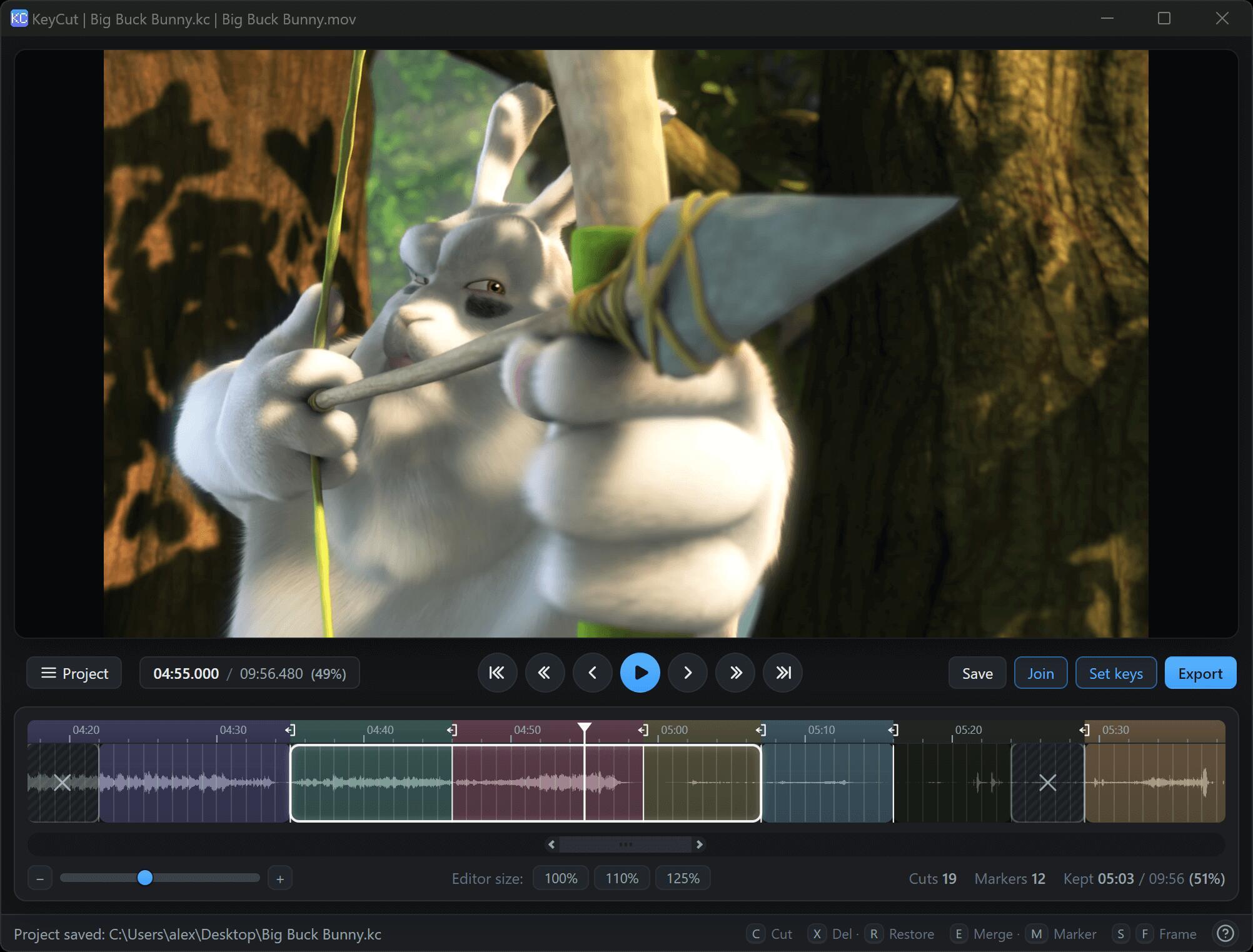
KeyCut is a video editor that cuts and joins videos without re-encoding. It splits video at keyframes and splices the kept parts back together, so the output keeps the original quality and the whole operation is fast.
Features
✅️ Lossless cutting and splicing – cuts snap to keyframes, exports are a direct copy
✅️ Export the kept segments as a single file, losslessly
✅️ Export each marker block as its own file
✅️ Split, delete, restore and merge segments directly on the timeline; resize edges, multi-select
✅️ Optional compression: universal x264 preset with resolution presets – Origin / 720p / 1080p / 1440p / 2160p
✅️ Timeline with audio waveform, keyframe snapping, zoom and frame stepping
✅️ Set keys: re-key a clip at 2 / 6 / 10 keyframes per second for frame-level precision
Keyboard
Keys Action
Space Play / pause
S / F Previous / next keyframe
Shift+S / Shift+F Previous / next block
Ctrl+Shift+S / Ctrl+Shift+F Previous marker / Start · Next marker / End
Ctrl+F · Enter / Shift+Enter Find marker · Next / Prev
Shift + Drag Scrub without snapping
0 / 1 Fit entire timeline
2 20 seconds around caret
C Cut at caret
X / Delete Delete segment
R Restore segment
E Merge segments
Ctrl + Click Multi-select segments
Ctrl + Drag Resize segment edges
M Add marker at caret
Middle click Add / remove marker
Ctrl+Z / Ctrl+Shift+Z / Ctrl+Y Undo / Redo
Ctrl+O / Ctrl+S Open / save project
Ctrl+E Export
Ctrl+W Close project
, par la KeyCut Team, initié par WebDesign Master (wdmcourses).
En JavaScript / CSS / HTML.
KeyCut est un