| 📰 Title: | WinPodX | 🕹️ / 🛠️ Type: | Tool |
|---|---|---|---|
| 🗃️ Genre: | Emulation | 👁️ Visual: | 2D & 3D |
| 🏷️ Category: | Emulation ➤ Engine ➤ WINDOWS | 🏝️ Perspective: | First person (interface) |
| 🔖 Tags: | Emulation; MICROSOFT; windows | ⏱️ Pacing: | Real Time |
| 🐣️ Approx. start: | 2026-04-05 | 👫️ Played: | Single |
| 🐓️ Latest: | 2026-09-15 | 🚦 Status: | 01. Awaiting entry (no status) |
| 📍️ Version: | Latest: - // Dev: 0.11 / 36e4f22 | ❤️ Like it: | 9. ⏳️ |
| 🏛️ License type: | 🕊️ Libre | 🎀️ Quality: | 7. ⏳️ |
| 🏛️ License: | MIT | ⭐ (temporary): | |
| 🎰️ ID: | 16686 | 🐛️ Created: | 2026-09-16 |
| 💡 Lights on: | 🚧️ Some work remains to be done: | ||
|---|---|---|---|
| 📰 What's new?: | 💥️ New | 💭️ New version published (to be updated): | |
| 🦣️ Awaiting publication on Mastodon: | 🎨️ Significant improvement: | ||
| 🦺️ Work in progress: |  |
🎖️ This work: |  |
| 📰 Previous News: | 🛜️ RSS (on RSS Guard): | |
|
| 👫️ Contrib.: | goupildb | 🛜️ Reading frequency: | 0w (well-spaced updates) |
| 🐜️ Updated: | 2026-09-16 |
| 📦️ Package name: | winpodx | ..... 📦️ Arch: | |
|---|---|---|---|
| 📄️ Source: | |
..... 📦️ RPM: | |
| ⚙️ Generic binary: | ..... 📦️ Deb: | |
|
| 🌍️ Browser version: | ..... 📦️ AppImage: | |
|
| 📱️ Mobile support: | ..... 📦️ Flatpak: | ||
| 🧹️ Not use: | ..... 📦️ Snap: |
🏡️ Website & videos
• Website: [Homepage] [Dev site] [Features/About] [Screenshots]
• Videos: t(202xxx) gd(202xxx) gu(202xxx) r(202xxx) lp(202xxx) ht(202xxx)
ht(202xxx) ht(202xxx) ht(202xxx) ht(202xxx) ht(202xxx) ht(202xxx) ht(202xxx)
g(202xxx) g(202xxx) g(202xxx) g(202xxx) g(202xxx) g(202xxx) g(202xxx) g(202xxx) g(202xxx) g(202xxx) g(202xxx) g(202xxx) g(202xxx)
g[fr](202xxx) g[de](202xxx) g[ru](202xxx) g[pl](202xxx) g[cz](202xxx) g[sp](202xxx) g[pt](202xxx) g[it](202xxx) g[tr](202xxx)]
• Doc: [WIKI] [FAQ]
• Updates: [RSS] / [Changelog 1(news/blog) 2(release notes) 3(tags) 4(commits)]
💰 Commercial
• [Support their work (Donate)]
🍩️ Resources
• (empty, license): [Homepage] [Dev site] 🎬️ g(202xxx)
🛠️ Technical informations
[PCGamingWiki] [MobyGames]
🦣️ Social
Devs (WinPodX Team 1 2 [fr] [en]): [Site 1 2] [Chat] [mastodon] [Bluesky] [PeerTube] [YouTube] [PressKit] [Interview 1(202xxx) 2(202xxx)]
Devs (Kim DaeHyun (kernalix7) 1 2 [fr] [en]): [Site 1 2] [Chat] [mastodon] [Bluesky] [PeerTube] [YouTube] [PressKit] [Interview 1(202xxx) 2(202xxx)]
The Project: [Blog] [Chat] [Forums] [mastodon] [Bluesky] [PeerTube] [YouTube] [PressKit] [Lemmy] [reddit] [Discord]
🐝️ Related
📦️ Misc. repositories
[Repology] [pkgs.org] [Generic binary] [Arch Linux / AUR] [openSUSE(author's repo)] [Debian/Ubuntu(author's repo)] [Flatpak] [AppImage(author's repo)] [Snap] [PortableLinuxGames]
🕵️ Reviews
[HowLongToBeat] [metacritic] [OpenCritic] [iGDB]
🕊️ Source of this Entry: [PlayingTux (20260907)]
🦣️ Social Networking Update (on mastodon)
🛠 Title: WinPodX
🦊️ Idea:
🏡️ https://www.winpodx.org
🐣️ https://github.com/kernalix7/winpodx
🔖 #LinuxEmulation #Microsoft #Windows
📦️ #Libre #Arch #RPM #Deb #AppIm
📕️ https://lebottinlinux.vps.a-lec.org/LO.html
🥁️ Update: 0.11.0
⚗️ Major release (Unst.)🍏️
📌️ Changes: https://github.com/kernalix7/winpodx/releases
🦣️ From: https://mastodon.social/@playingtux/117228429543557874
🛜️ https://github.com/kernalix7/winpodx/tags.atom
🏝️ https://www.youtube.com/embed/
🦉️ https://www.youtube.com/embed/
🐹️ https://www.youtube.com/embed/
🕵️ https://www.youtube.com/embed/
🕯️https://www.youtube.com/embed/
🕯️https://www.youtube.com/embed/
🕯️https://www.youtube.com/embed/
🕯️[fr] https://www.youtube.com/embed/
🎲️ https://www.youtube.com/embed/
🎲️ https://www.youtube.com/embed/
🎲️ https://www.youtube.com/embed/
🎲️[fr] https://www.youtube.com/embed/
🎲️👤️https://www.youtube.com/embed/
🎲️👤️https://www.youtube.com/embed/
🎲️👥️ https://www.youtube.com/embed/
🎮️ https://www.youtube.com/embed/
🎮️ https://www.youtube.com/embed/
🎮️ https://www.youtube.com/embed/
🐧https://www.youtube.com/embed/
🐧https://www.youtube.com/embed/
🕶️
📚️ WinPodX is a
🕵 xxx: (🧪️Not_tested)
📜️ "blabla" 📜️
Windows pod system for Linux
Click an app.
Word opens. That's it.
Native Linux windows for every Windows app — real icons, real WM_CLASS, pin-to-taskbar. FreeRDP RemoteApp + dockur/windows. Zero config.
What you get
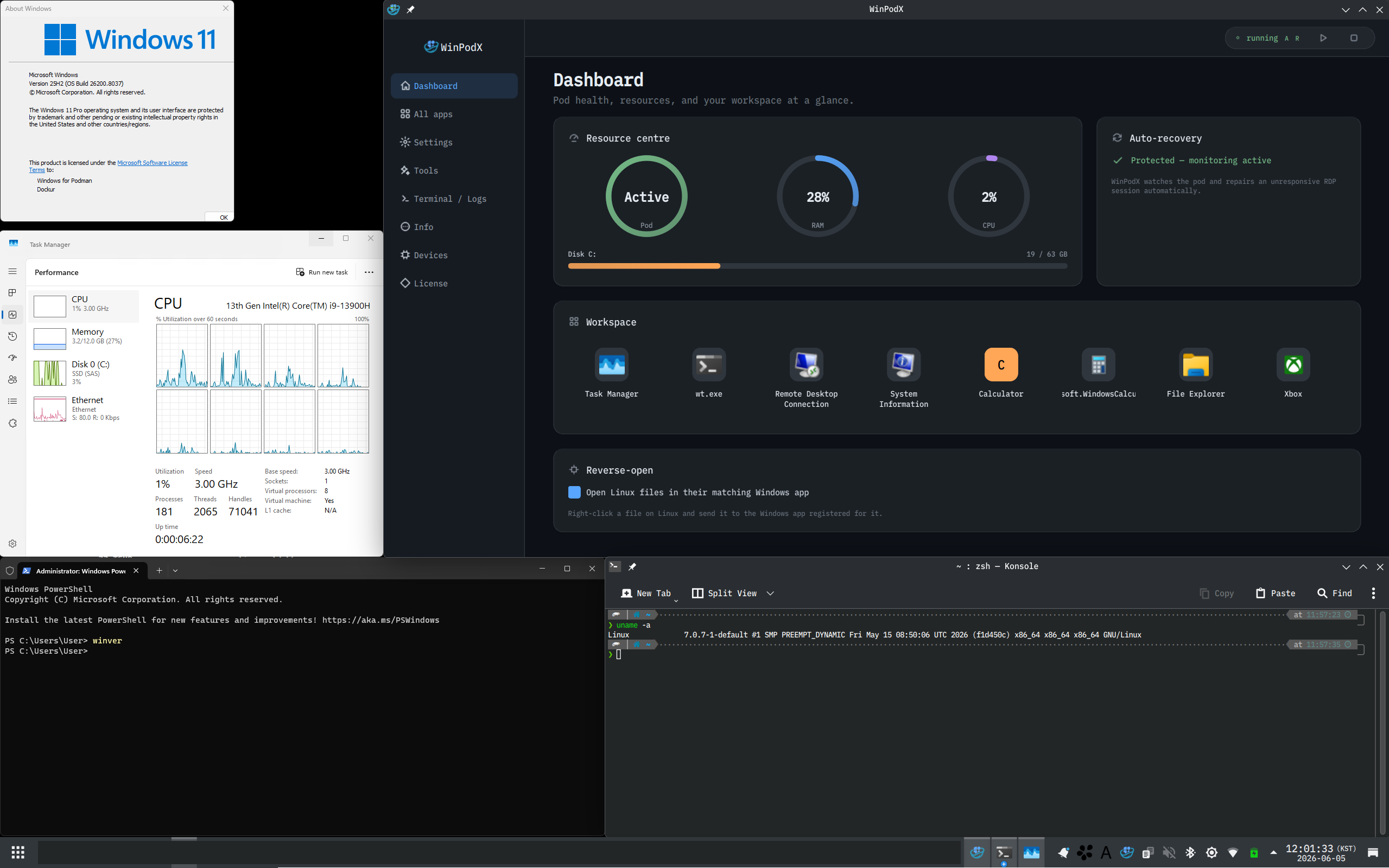
Each Windows app opens as its own Linux window, keeping its icon, taskbar entry, and file associations. Clipboard, audio, printers, and your home directory are shared both ways. You only see a full Windows desktop when you ask for one with winpodx app run desktop.
WinPodX runs Windows in a container in the background and starts it on demand — the pod pauses when idle and wakes on your next launch.
Requirements
Virtualization must be available before Windows can boot.
How it works
No manual VM wrangling. WinPodX provisions everything on the first app click.
1. Install & setup
One command pulls a Windows container (dockur/windows) in rootless Podman, runs an unattended Windows install, and applies the RemoteApp + agent setup.
2. Apps auto-discovered
By default, WinPodX adds only the apps your Windows Start Menu actually shows — mirrored into matching folder sub-groups — each as a Linux .desktop entry with its real icon. Opt in with desktop.full_app_scan to also sweep the registry App Paths, UWP/MSIX, Chocolatey and Scoop.
3. Click & launch
Click the app like any native one. It opens in its own Linux window via FreeRDP RemoteApp — pinnable, alt-tabbable, file-associated. No full desktop.
Why not just RDP, a VM, or Wine?
WinPodX keeps real Windows compatibility while feeling native.
What it does
Each Windows app becomes its own Linux window — pinnable, alt-tabbable, file-associated, both directions.
Seamless app windows
✅️ RemoteApp (RAIL) renders each app as a native window — no desktop
✅️ Per-app taskbar icons via WM_CLASS matching
✅️ Double-click .docx → Word opens; open a second file and it lands in the already-running app
✅️ Click a mailto: link → Outlook opens; app schemes (slack:, vnc:) route to the right Windows app (auto-detected)
✅️ Multi-session RDP: up to 25 independent sessions
✅️ Multi-monitor RAIL by default — drag a window to a second screen, keep working
Reverse-open
✅️ Linux apps appear in the Windows "Open with…" menu, by default
✅️ Launch a Linux app on its own from the Windows Start Menu's Linux Apps folder — no file needed
✅️ Correct per-app icons in both Windows chooser dialogs
✅️ Round-trips the file open back to host xdg-open
✅️ Auto-discovers host apps + MIME from freedesktop standards
✅️ Opens Windows-side files too — guest C: mounts on the host, edits save back (SMB + kio-fuse, KDE)
Zero-config launch
✅️ First click auto-provisions config, container, desktop entries
✅️ First-boot discovery adds your Start Menu apps with their real icons
✅️ Start-Menu-only by default; opt-in full scan adds registry App Paths, all UWP/MSIX, Chocolatey, Scoop
✅️ Backends: Podman (default), Docker, manual RDP
Peripherals & sharing
✅️ Clipboard (text + images), sound, printers — on by default
✅️ Home directory shared as \\tsclient\home
✅️ USB drives shared in-session; live USB device passthrough
✅️ Smart DPI scaling auto-detected from your desktop
Automation & resilience
✅️ Auto suspend / resume; optional pod auto-start on login
✅️ Opt-in idle auto-stop fully stops the VM and frees its RAM
✅️ Self-heals a stalled RDP guest (UNRESPONSIVE → recover)
✅️ Password auto-rotation; Windows disk auto-grow
✅️ Health checks + auto-fix via winpodx doctor --fix
Lean & private
✅️ Near-zero Python deps — stdlib only on 3.11+
✅️ No telemetry, ever
✅️ Multilingual UI (en / ko / zh / ja / de / fr / it)
✅️ Windows 11 Settings-style desktop app: Dashboard, Applications, Settings, Tools, Terminal, Info, Devices, and tray
Works on
One-line install across the major Linux families.
, par la WinPodX Team, initié par Kim DaeHyun (kernalix7).
En Python / PowerShell/Shell.
WinPodX est un