| 📰 Title: | Synfig Studio | 🕹️ / 🛠️ Type: | Tool |
|---|---|---|---|
| 🗃️ Genre: | Development | 👁️ Visual: | 2D |
| 🏷️ Category: | Development ➤ Graphics Editor ➤ Animation | 🏝️ Perspective: | First person (interface) |
| 🔖 Tags: | Development; Content Creation; Motion Graphics; Animation; Image Manipulation; MLT Framework; Raster graphics editor; Vector graphics editor | ⏱️ Pacing: | Real Time |
| 🐣️ Approx. start: | 2009-06-14 | 👫️ Played: | Single |
| 🐓️ Latest: | 2026-01-18 | 🚦 Status: | 04. Released (status) |
| 📍️ Version: | Latest: 💥️ 1.3.8➜1.5.4 / Dev: d8951f9 | ❤️ Like it: | 9. ⏳️ |
| 🏛️ License type: | 🕊️ Libre | 🎀️ Quality: | 7. ⏳️ |
| 🏛️ License: | GPL-2+ | ✨️ (temporary): | |
| 🐛️ Created: | 2018-05-20 | 🐜️ Updated: | 2026-01-24 |
| 📦️ Package name: | synfig, synfigstudio | ..... 📦️ Arch: |  |
|---|---|---|---|
| 📄️ Source: | |
..... 📦️ RPM: | |
| ⚙️ Generic binary: | ..... 📦️ Deb: | |
|
| 🌍️ Browser version: | ..... 📦️ AppImage: | |
|
| 📱️ PDA support: | ..... 📦️ Flatpak: | |
|
| ✨️ Not use: | ..... 📦️ Snap: | |
| 💡 Lights on: | |
🦺️ Work in progress: | |
|---|---|---|---|
| 📰 What's new?: | 🍎️ (Stable) Major release | 💭️ New version published (to be updated): | |
| 👻️ Temporary: | 🚧️ Some work remains to be done: | ||
| 🎨️ Significant improvement: | |
🎖️ This work: |  |
| 📰 Previous News: | |
👫️ Contrib.: | goupildb & Louis |
| 🎰️ ID: | 15418 |
| 📜️[en]: | A libre, multiplatform 2D animation software that enables designers to create cinema-quality animations from vector and bitmap images without having to create intermediate images, resulting in higher-quality 2D animations with fewer resources. In particular, it offers the ability to transform any vector shape into another (with automatic calculation of intermediate images, the same for bitmap images after applying a “skeleton”), it enables linking the parameters of different layers directly or through mathematical expressions, and it provides over 50 layers for creating complex illustrations and animations. | 📜️[fr]: | Un logiciel d'animation 2D libre et multiplateforme permettant de concevoir des animations de qualité cinématographiques à partir d'images vectorielles et bitmap, sans devoir créer les images intermédiaires, ce qui permet de produire des animations 2D de meilleure qualité avec moins de ressources. Il offre notamment la possibilité de transformer n'importe quelle forme vectorielle en une autre (avec calcul automatique des images intermédiaires, idem pour les images bitmap après leur avoir appliqué un "squelette"), il permet de lier les paramètres de différents calques directement ou par des expressions mathématiques, et il fournit plus de 50 couches pour créer des illustrations et des animations complexes. |
|---|
🏝️ Trailer: (201701),
🐹️ From Users: 💥️ (202510),
💎 Features: (201505),
🕯️ How To: 💥️ (202006), 💥️ (202207), 💥️ (202010),
🏎️ Speedrun: 💥️ (202009), 💥️ (201712),
🎮️ Showcase:(201211), (201802), (200606),
🏡️ Website & videos
• Website: [Homepage] [Dev site] [Features/About] [Screenshots]
• [Videos: ft(201505) t(201701) gd(202xxx) gu(202510) r(202xxx) lp(202xxx) sr(202009) sr(201712) d(201211) d(201802) d(200606) d(201001) d(201611) ht(202006) ht(202207) ht(202010) ht(202010) ht(201507) ht(201605) ht[fr](202xxx) ht[de](202xxx) ht[ru](202xxx) ht[pl](202xxx) ht[cz](202xxx) ht[sp](202xxx) ht[pt](202xxx) ht[it](202xxx) ht[tr](202xxx)]
• Doc: [WIKI] [FAQ]
• Updates: [RSS] / [Changelog 1(news/blog) 2 3]
💰 Commercial
• [Support their work (Donate)] [Patreon]
🍩️ Resources
• (empty, license): [Homepage] [Dev site] 🎬️ ht(202xxx)
🛠️ Technical informations
[Open Hub] [PCGamingWiki] [MobyGames]
🦣️ Social
Devs (Synfig Studio) (Synfig Studio Team 1 2 [fr] [en]): [Site 1 2] [Chat] [mastodon] [PeerTube] [YouTube] [PressKit] [Interview 1(202xxx) 2(202xxx)]
Devs (Synfig Studio) (Robert Quattlebaum (darco) [fr] [en]): [Site 1 2] [Chat] [mastodon] [PeerTube] [YouTube] [PressKit] [Interview 1(202xxx) 2(202xxx)]
Devs (Synfig Studio) (Adrian Bentley [fr] [en]): [Site 1 2] [Chat] [mastodon] [PeerTube] [YouTube] [PressKit] [Interview 1(202xxx) 2(202xxx)]
Devs (MLT) (MLT Team [fr] [en]): [Site 1 2] [Chat] [mastodon] [PeerTube] [YouTube] [PressKit] [Interview 1(202xxx) 2(202xxx)]
The Project: [Blog] [Forums] [mastodon] [Facebook] [PeerTube] [YouTube] [PressKit] [reddit] [Discord]
🐝️ Related
[Wikipedia (Synfig) [fr] [en] [de]]
[Debian/Ubuntu]
📦️ Misc. repositories
[Repology] [pkgs.org] [Generic binary] [Arch Linux / AUR] [openSUSE] [Debian/Ubuntu] [Flatpak] [AppImage (author's repo)] [Snap] [PortableLinuxGames]
🕵️ Reviews
[HowLongToBeat] [metacritic] [OpenCritic] [iGDB]
🕊️ Source of this Entry: [Site (date)]
🦣️ Social Networking Update (on mastodon)
🛠️ Title: Synfig Studio
🦊️ What's: 2D animation tool based on vector | bitmap images
🏡️ https://www.synfig.org/
🐣️ https://github.com/synfig
🔖 #LinuxGameDev #Animation
📦️ #Libre #Arch #RPM #Deb #Flatpak #AppIm #Snap
📕️ https://lebottinlinux.vps.a-lec.org/LO.html
🌠️ Sorry for the missed release(s)
🥁️ Update: 1.3.8➜1.5.4
⚗️ Major release(Stable)🍎️
📌️ Changes: https://github.com/synfig/synfig/releases
🦣️ From: https://mastodon.social/@morevnaproject/115917124965223832
🛜️ https://github.com/synfig/synfig/releases.atom
🏝️ https://www.youtube.com/embed/N8SF_-gJ0_w
🕯️https://www.youtube.com/embed/?list=PL3bGFEcFKSGYyAp-RzQ2BDcAoaYLg4Ql9
🕯️https://www.youtube.com/embed/?list=PLjuma0nCUc48790w-SaPViLtfNFB7erCM
🏎️ https://www.youtube.com/embed/d0qZUfNk6wk
🎮️ https://www.youtube.com/embed/PThy9_RZQ8c
🎮️ https://www.youtube.com/embed/ecVv2IB7f5k
🎮️ https://www.youtube.com/embed/wwSZZivjQMo
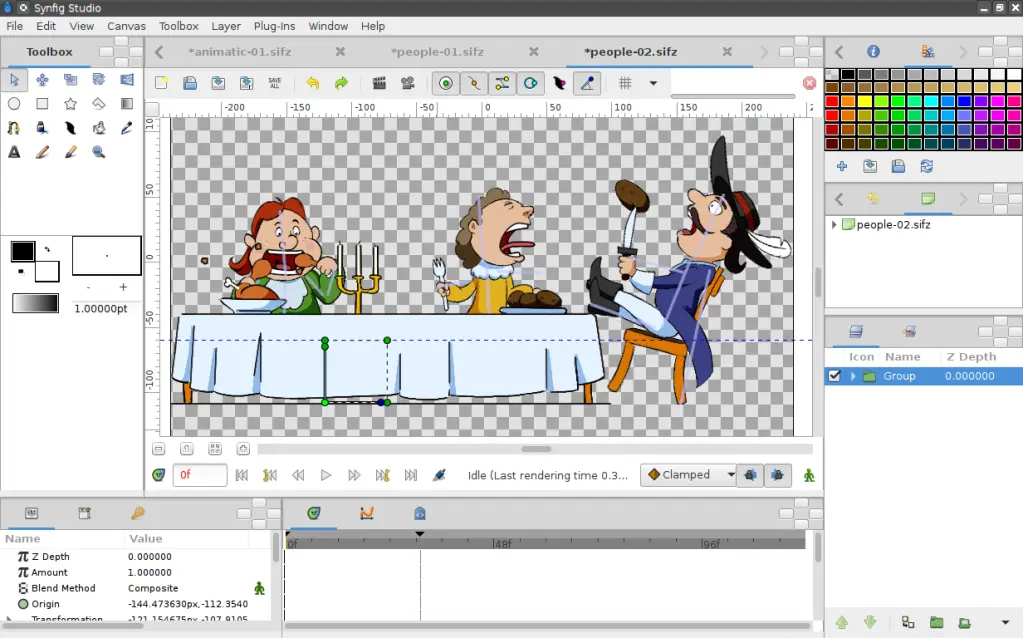
🕶️ A view of its user interface (taken from the author's website) with the image being animated in the center, and the drawing tools and timeline on either side.
📚️ Synfig Studio is a libre, multiplatform 2D animation software that enables designers to create cinema-quality animations from vector and bitmap images without having to create intermediate images, resulting in higher-quality 2D animations with fewer resources. In particular, it offers the ability to transform any vector shape into another (with automatic calculation of intermediate images, the same for bitmap images after applying a “skeleton”), it enables linking the parameters of different layers directly or through mathematical expressions, and it provides over 50 layers for creating complex illustrations and animations.
📜️ "2D animation software for designing animations from vector or bitmap images" 📜️
Open-source 2D animation software
Synfig Studio is a free and open-source 2D animation software, designed as powerful industrial-strength solution for creating film-quality animation using a vector and bitmap artwork. It eliminates the need to create animation frame-by frame, allowing you to produce 2D animation of a higher quality with fewer people and resources. Synfig Studio is available for Windows, Linux and MacOS X.
Synfig is a free and open-source software licensed under GNU GPL v3.
Features
✅️ VECTOR TWEENING
Transform any vector shape into another! Synfig gives you powerful tools for full control on your vector artwork. Just set the key positions and inbetween frames will be calculated automatically.
✅️ LAYERS AND FILTERS
Synfig provides 50+ layers to create artwork and animation of any complexity. Choose from various layer types: geometric, gradients, filters, distortions, transformations, fractals and others.
✅️ BONES
Full-featured bone system allows to create cutout animation using bitmap images or control your vector artwork. Use additional Skeleton Distortion layer to apply complex deformations to bitmap artwork.
✅️ ADVANCED CONTROLS
You can link parameters of various layers – directly or through mathematical expressions. This allows you to create advanced character puppets and other dynamic structures.
Un logiciel d'animation 2D permettant de concevoir des animations à partir d'images vectorielles ou bitmap, par la Synfig Studio Team, initié par Robert Quattlebaum (darco) (avec contributions d'Adrian Bentley).
En C++. Il utilise le framework Media Lovin' Toolkit (MLT).
Synfig Studio est un logiciel d'animation 2D libre et multiplateforme permettant de concevoir des animations de qualité cinématographiques à partir d'images vectorielles et bitmap, sans devoir créer les images intermédiaires, ce qui permet de produire des animations 2D de meilleure qualité avec moins de ressources. Il offre notamment la possibilité de transformer n'importe quelle forme vectorielle en une autre (avec calcul automatique des images intermédiaires, idem pour les images bitmap après leur avoir appliqué un "squelette"), il permet de lier les paramètres de différents calques directement ou par des expressions mathématiques, et il fournit plus de 50 couches pour créer des illustrations et des animations complexes.
Le format de sortie est un dérivé du XML, et il peut exporter en format vidéo, images animés (GIF, MNG) ou sortir des séquences d'images.
Crédit image (lien ci-dessus): Debian
Logiciel d'animation 2D open source
Synfig Studio est un logiciel d'animation 2D libre et open source, conçu comme une solution industrielle puissante pour créer des animations de qualité cinématographique à partir d'illustrations vectorielles et bitmap. Il élimine le besoin de créer des animations image par image, vous permettant ainsi de produire des animations 2D de meilleure qualité avec moins de personnel et de ressources. Synfig Studio est disponible pour Windows, Linux et MacOS X.
Synfig est un logiciel libre et open source sous licence GNU GPL v3.
Caractéristiques
✅️ INTERPOLATION VECTORIELLE
Transformez n'importe quelle forme vectorielle en une autre ! Synfig vous offre des outils puissants pour contrôler entièrement vos illustrations vectorielles. Il vous suffit de définir les positions clés et les images intermédiaires seront calculées automatiquement.
✅️ COUCHES ET FILTRES
Synfig fournit plus de 50 couches pour créer des illustrations et des animations de toute complexité. Choisissez parmi différents types de couches : géométriques, dégradés, filtres, distorsions, transformations, fractales et autres.
✅️ OS
Le système d'os complet permet de créer des animations découpées à l'aide d'images bitmap ou de contrôler vos illustrations vectorielles. Utilisez le calque supplémentaire « Déformation du squelette » pour appliquer des déformations complexes aux illustrations bitmap.
✅️ COMMANDES AVANCÉES
Vous pouvez lier les paramètres de différents calques, directement ou via des expressions mathématiques. Cela vous permet de créer des marionnettes de personnages avancées et d'autres structures dynamiques.