| 📰 Title: | WinePortable & GEProtonPortable | 🕹️ / 🛠️ Type: | Tool |
|---|---|---|---|
| 🗃️ Genre: | Emulation | 👁️ Visual: | Text |
| 🏷️ Category: | Emulation ➤ Engine ➤ MICROSOFT | 🏝️ Perspective: | First person (interface) |
| 🔖 Tags: | Emulation; windows | ⏱️ Pacing: | Real Time |
| 🐣️ Approx. start: | 2026-05-11 | 👫️ Played: | Single |
| 🐓️ Latest: | 2026-07-05 | 🚦 Status: | 05. Tested & Working (status) |
| 📍️ Version: | Latest: GEProtonPortable: 2026.07.05 // WinePortable: 2026.05.11 | ❤️ Like it: | 1. 🙏️⭐⭐⭐⭐⭐ (fantastic) |
| 🏛️ License type: | 🎁 Free of charge | 🎀️ Quality: | 1. 🏆️⭐⭐⭐⭐⭐ (perfect) |
| 🏛️ License: | Free ? | Libre? | ⭐ (temporary): | |
| 🎰️ ID: | 16592 | 🐛️ Created: | 2026-07-11 |
| 💡 Lights on: | 🚧️ Some work remains to be done: | ||
|---|---|---|---|
| 📰 What's new?: | 💥️ New | 💭️ New version published (to be updated): | |
| 🦣️ Awaiting publication on Mastodon: | 🎨️ Significant improvement: | ||
| 🦺️ Work in progress: | 🎖️ This work: |  |
|
| 📰 Previous News: | 🛜️ RSS (on RSS Guard): | ||
| 👫️ Contrib.: | goupildb | 🛜️ Reading frequency: | |
| 🐜️ Updated: | 2026-07-25 |
| 📦️ Package name: | ..... 📦️ Arch: | ||
|---|---|---|---|
| 📄️ Source: | ..... 📦️ RPM: | ||
| ⚙️ Generic binary: |  |
..... 📦️ Deb: | |
| 🌍️ Browser version: | ..... 📦️ AppImage: | ||
| 📱️ Mobile support: | ..... 📦️ Flatpak: | ||
| 🧹️ Not use: | ..... 📦️ Snap: |
| 📜️[en]: | A free (libre?) tool that makes it even easier to use Windows applications on Linux, by allowing them to be run from a dedicated file manager. It provides a file explorer, as well as a complete environment based on Wine, Proton and standard libraries, so that all the user needs to do is unzip the tool – thereby creating a directory into which they can copy their Windows applications – and then launch the included file explorer to run their Windows applications via its interface. A simple, streamlined, user-friendly and brilliant tool! | 📜️[fr]: | Un outil gratuit (libre ?) simplifiant encore davantage l'utilisation d'applications Windows sous Linux, en offrant de les exécuter depuis un gestionnaire de fichier spécifique. Il fournit l'explorateur de fichier, ainsi qu'un environnement complet basé sur Wine, Proton et des bibliothèques standards, de sorte que les actions de l'utilisateur se réduisent à décompresser l'outil - créant ainsi un répertoire dans lequel il copie ses applications Windows, puis à lancer l'explorateur de fichier livré afin d'exécuter ses applications Windows depuis son interface. Un outil simple, épuré, ergonomique et génial ! |
|---|
🏡️ Website & videos
• Website: [Homepage] [Dev site] [Features/About] [Screenshots]
• Videos: t(202xxx) gd(202xxx) gu(202xxx) r(202xxx) lp(202xxx) ht(202xxx) g(202xxx) g[fr](202xxx) g[de](202xxx) g[ru](202xxx) g[pl](202xxx) g[cz](202xxx) g[sp](202xxx) g[pt](202xxx) g[it](202xxx) g[tr](202xxx)]
• Doc: [WIKI] [FAQ]
• Updates: [RSS] / [Changelog 1(news/blog) 2(release notes)(not used/no info) 3(tags) 4(commits)(not used/no info)]
💰 Commercial
• [Support their work (Donate)]
🍩️ Resources
🔘️ Examples
• Red Planet Rampage (A dieselpunk western-themed arena shooter where players face off with wacky modular guns, BSD-4-Clause): [Homepage] [Dev site] [Itch.io] [Steam] 🎬️ t(202402)
🛠️ Technical informations
[PCGamingWiki] [MobyGames]
🦣️ Social
Devs (Sébastien SAUVAGE (sebsauvage) 1 2 [fr] [en]): [Site 1 2] [Chat] [mastodon] [Bluesky] [PeerTube] [YouTube] [PressKit] [Interview 1(202xxx) 2(202xxx)]
The Project: [Blog] [Chat] [Forums] [mastodon] [Bluesky] [PeerTube] [YouTube] [PressKit] [Lemmy] [reddit] [Discord]
🐝️ Related
📦️ Misc. repositories
[Repology] [pkgs.org] [Generic binary] [Arch Linux / AUR] [openSUSE] [Debian/Ubuntu] [Flatpak] [AppImage(author's repo)] [Snap] [PortableLinuxGames]
🕵️ Reviews
[HowLongToBeat] [metacritic] [OpenCritic] [iGDB]
🕊️ Source of this Entry: [Site (date)]
🦣️ Social Networking Update (on mastodon)
🛠️ Title: WinePortable / GEProtonPortable
🦊️ Idea: A free (libre?) tool that makes it even easier to use Windows apps on Linux, by allowing them to be run from a dedicated file manager
🏡️ https://sebsauvage.net/wiki/doku.php?id=wineportable
🐣️ -
🦣️ https://framapiaf.org/@sebsauvage
🔖 #LinuxEmulation #Microsoft
📦️ #Libre #Bin
📕️ https://lebottinlinux.vps.a-lec.org/LO.html
🕵 GEProtonPortable: 2026.07.05: 🙏️⭐⭐⭐⭐⭐
🥁️ Update: 2026.07.05
⚗️ No changelog 🙈️🙉️🙊️
📌️ Changes: -
🦣️ From: https://framapiaf.org/@sebsauvage/116860918147158328
🛜️ -
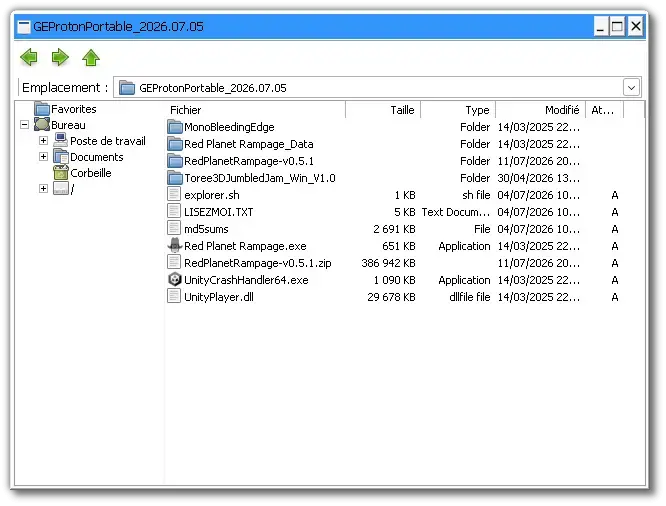
🕶️ A view of its UI (v. 2026.07.05, on my Linux PC) in action after unpacking a game (“Red Planet Rampage”, https://hackerspace.itch.io/red-planet-rampage, which uses the Unity engine – sorry, I’ve cluttered up my screenshot a bit with files and executables that have nothing to do with WinePortable & GEProtonPortable). The tool’s interface is a standard file browser with a Windows-style window displaying a file tree. All I need to do is click on my game’s executable (in this case: “Red Planet Rampage.exe”) to launch it.
📚️ WinePortable / GEProtonPortable is a free (libre?) tool that makes it even easier to use Windows applications on Linux, by allowing them to be run from a dedicated file manager. It provides a file explorer, as well as a complete environment based on Wine, Proton and standard libraries, so that all the user needs to do is unzip the tool – thereby creating a directory into which they can copy their Windows applications – and then launch the included file explorer to run their Windows applications via its interface. A simple, streamlined, user-friendly and brilliant tool!
🕵 GEProtonPortable: 2026.07.05: 🙏️⭐⭐⭐⭐⭐
🟢️ A simple, sleek, user-friendly and brilliant tool!
📜️ "A free (libre?) tool that makes it even easier to use Windows apps on Linux, by allowing them to be run from a dedicated file manager" 📜️
Introduction
You can use Wine to play Windows games on Linux. However, installing Wine is rather tedious: adding the Wine repository keys, adding the repository itself, running `apt update` and `apt install`, creating a prefix, adding runtimes with winetricks…
WinePortable/GEProtonPortable aims to simplify the process of running Windows games on Linux:
• Unzip
• Copy your Windows games into it
• Run explorer.sh: A small file explorer will appear, and you can launch your games.
WinePortable is based on the AppImage version of Wine, supplemented by a few scripts and a pre-configured prefix containing everything you need: VCRunC++, dxvk, vkd3d, allfonts, DotNet4, XNA 4, OpenAL and PhysX. GEProtonPortable is based on the same principle, but uses GE-Proton instead of Wine.
This allows over 90 per cent of Windows games to run directly on Linux without having to install Wine or GE-Proton.
WinePortable/GEProtonPortable have been successfully tested on several distributions: Debian, Ubuntu, Linux Mint, Arch, Manjaro, Endeavour, Bazzite…
And yes: you can even carry your games on a USB stick and play them on almost any Linux system.
Usage
Once WinePortable/GEProtonPortable has been unpacked, copy your Windows games directly into it.
A small 3D game is provided for testing: Toree3DJumbledJam_Win_V1.0. It is a Windows DirectX game.
On slightly older graphics cards or those with poor Vulkan support, some games will not work. In this case, use WinePortable instead and run explorer-noVulkan.sh (this will use Wine’s native DirectX emulation rather than going via dxvk/vkd3d).
Custom launcher
Instead of using the file explorer to launch games, you can of course use your own shell script.
In most Linux distributions, you can right-click on the desktop, select ‘Create launcher here’ and point it to your shell script.
Contents
Here is what WinePortable contains:
• The AppImage version of Wine 11.7 (staging) (which also contains winetricks)
• Two shell launch scripts.
• A pre-configured Wine prefix containing various runtimes:
• vcrun2017-2026
• DotNet40
• Microsoft fonts (Times, Courier, Consolas, etc.)
• XNA 4
• OpenAL
• PhysX
• dxvk and vkd3d to emulate DirectX via Vulkan
• A small, free 3D game included for testing (Toree3DJumbledJam_Win_V1.0)
And for GEProtonPortable:
• The same, but with the GE-Proton 11.1 runtime and the umu-launcher instead of Wine.
Double-click on explorer.sh and select ‘Run in terminal’. A small Windows Explorer window will appear: you can now launch your games.
Un outil gratuit (libre ?) simplifiant encore davantage l'utilisation d'applications Windows sous Linux, en offrant de les exécuter depuis un gestionnaire de fichier spécifique, par Sébastien SAUVAGE (sebsauvage).
WinePortable / GEProtonPortable est un outil gratuit (libre ?) simplifiant encore davantage l'utilisation d'applications Windows sous Linux, en offrant de les exécuter depuis un gestionnaire de fichier spécifique. Il fournit l'explorateur de fichier, ainsi qu'un environnement complet basé sur Wine, Proton et des bibliothèques standards, de sorte que les actions de l'utilisateur se réduisent à décompresser l'outil - créant ainsi un répertoire dans lequel il copie ses applications Windows, puis à lancer l'explorateur de fichier livré afin d'exécuter ses applications Windows depuis son interface. Un outil simple, épuré, ergonomique et génial !
Présentation
On peut utiliser Wine pour jouer aux jeux Windows sous Linux. Mais l'installation de Wine est assez fastidieuse: Ajouter les clés du dépôt Wine, ajouter le dépôt lui-même, apt update, apt install, création d'un préfixe, ajout de runtimes avec winetricks…
WinePortable/GEProtonPortable veut simplifier le lancement des jeux Windows sous Linux:
• Décompressez
• Copiez vos jeux Windows dedans
• Lancez explorer.sh : Un petit explorateur de fichier s'affiche, vous pouvez lancer vos jeux.
WinePortable est basé sur la version AppImage de Wine, complétée par quelques scripts et un préfixe déjà préparé avec tout le nécessaire : VCRunC++, dxvk, vkd3d, allfonts, DotNet4, XNA 4, OpenAL et Physx. GEProtonPortable est basé sur le même principe, mais en utilisant GE-Proton à la place de Wine.
Cela permet de faire fonctionner directement plus de 90% des jeux Windows sous Linux sans avoir à installer Wine ou GE-Proton.
WinePortable/GEProtonPortable ont été testés avec succès sous plusieurs distributions: Debian, Ubuntu, Linux Mint, Arch, Manjaro, Endeavour, Bazzite…
Et oui: Vous pouvez même emporter vos jeux sur clé USB et y jouer sur presque n'importe quel système Linux.
Utilisation
Une fois WinePortable/GEProtonPortable décompressé, copiez vos jeux Windows directement dedans.
Double-cliquez sur explorer.sh et choisissez Exécuter dans un terminal. Un petit explorateur Windows va s'afficher: Vous pouvez lancer vos jeux.
Un petit jeu 3D est fourni pour tester: Toree3DJumbledJam_Win_V1.0. C'est un jeu Windows DirectX.
Sur les cartes graphiques un peu anciennes ou avec un mauvais support Vulkan, certains jeux ne fonctionneront pas. Dans ce cas, prenez plutôt WinePortable et lancez explorer-noVulkan.sh à la place (Cela va utiliser l'émulation DirectX native de Wine au lieu de passer par dxvk/vkd3d).
Lanceur personnalisé
Au lieu d'utiliser l'explorateur de fichiers pour lancer les jeux, vous pouvez bien entendu utiliser votre propre script shell.
Dans la plupart des distributions Linux, vous pouvez alors faire un clic-droit sur le bureau et choisir "Créer un lanceur ici" et pointer vers votre script shell.
Contenu
Voici ce que contient WinePortable:
• La version AppImage de Wine 11.7 (staging) (qui contient aussi winetricks)
• Deux scripts shell de lancement.
• Un préfixe Wine déjà préparé contenant divers runtimes:
• vcrun2017-2026
• DotNet40
• Polices de caractères Microsoft (Times, Courrier, Consolas, etc.)
• XNA 4
• OpenAL
• PhysX
• dxvk et vkd3d pour émuler DirectX via Vulkan
• Un petit jeu 3D gratuit fourni pour tester (Toree3DJumbledJam_Win_V1.0)
Et pour GEProtonPortable:
• La même chose, mais avec le runtime GE-Proton 11.1 et le lanceur umu-launcher à la place de Wine.
⚙️ Installation à partir du binaire
⛓️ Installation à partir du binaire classique :
• Un binaire statique est disponible, décompressez le livrable, et rendez son binaire exécutable (clic droit sous votre gestionnaire de fichier).
🚀️ LANCEMENT DE L'INTERFACE
▸ Classique :
• Si vous l'avez installé à partir d'un paquet / dans l'un des répertoires système : [Alt+F2] explorer.sh ou $ explorer.sh
• Ou, rendez son binaire exécutable (clic droit sous votre gestionnaire de fichier) et cliquez dessus, ou dans le répertoire où se trouve le binaire lancez : $ ./explorer.sh
💡 Nota : si vous l'avez installé via votre gestionnaire de paquets et ne connaissez pas le nom précis du binaire, sélectionnez le paquet dans votre gestionnaire, et dans l'onglet “Fichiers” recherchez son nom dans l'arborescence d'installation (le binaire est généralement installé dans /usr/bin/).
📑️ PARAMÉTRAGE
💡 Nota : L'objet de cette section est de fournir quelques suggestions / Conseils
Installation d'une application / jeu:
• Il suffit de copier le répertoire de votre application dans celui de cet outil.
Lancement d'une application / jeu Windows:
• Il suffit de lancer le gestionnaire de fichier livré (voir ci-avant, lancez : $ ./explorer.sh)
• A l'aide de ce gestionnaire de fichier cliquez sur l'exécutable de votre application.
● 📜️ Préambule :
⚬ 1ere édition : le 12 juillet 2026 sous Manjaro. Par : goupildb. ⏱️ Durée du test : 20 minutes. 🎯️ Objectif : Initialisation de l'entrée, tests et premières impressions.
● 💻️ PC specs :
Linux distribution: Manjaro
Kernel: 7.0.13-1-MANJARO +iw (pour le wi-fi) + acpi_call-dkms + rapiddisk-dkms + uwurandom-git-dkms + v4l2loopback-dkms
Graphics driver: NVIDIA 610.43.02 (proprietary version, via Manjaro)
Desktop environment: X-Cinnamon (6.6.8) / Xorg 11.0 (21.1.23)
CPU: AMD Ryzen 7 2700X (3,7GHz, 8 cores)
Motherboard: MSI B450 GAMING PRO CARBON AC (RVB) + (zenpower-dkms + zenpower3-dkms + iwlwifi-ax101-dkms)
RAM: 32Go DDR4 (2x16GB)
Graphics card: GeForce RTX 2070 (TU106)
Hard disk: 1TB NVMe Force MP510 + 2x4TB Seagate Barracuda + 2x12TB Seagate IronWolf
Monitors: 1 x ASUS ROG Swift PG348Q (3440x1440) (The other died after a micro-power cut 😤️) + 1 x ASUS ROG Swift OLED PG48UQ 47,5" (3840x2160) (Get used to it 🦒️)
Webcam: Logitech HD Pro Webcam C920 (1080p@30FPS, stereo mic.)
Microphone: Samson G-Track pro Condenser
Keyboard: Keychron K1 Pro
MIDI keyboard: ARTURIA Minilab 3
Mouse: G-Lab Kult-Iridium (RVB)
Tablet: WACOM PTZ-930 (Intuos 3) (input-wacom-dkms-patched required)
Printer: brother MFC-L2800DW (brother-mfc-l2820dw (Print) + brscan5 (Scan) required).
Gamepads (test: jstest-gtk):
- (USB): Logitech Rumblepad (2 analog pads, one digital pad, + force feedback).
- (Bluetooth): Microsoft Xbox Elite Wireless Controller Series 2 (xpadneo-dkms required + Plugging & unplugging the gamepad to load the driver. If necessary, leave the gamepad connected)(drift | not recognized by games if battery low)
● 🫕️ Installation :
‣ (✔ v. GEProtonPortable: 2026.07.05) Binaire classique : FONCTIONNEL.
🟢️ Il est très facile à installer et à lancer grâce au binaire fourni.
● 🏗️ Réalisation :
▸ 🐥️ Avancement de son développement en : Juillet 2026
🟢️ Il/Elle est tout à fait fonctionnel(le).
▸ 📟️ Interface
🟢️ Une interface simple, épurée, ergonomique.
▸ 🎮️ Contrôles
⚪️ Il/Elle se contrôle à la souris.
● 👾️ Gameplay :
▸ ⛳️ Objectif / Thème
⚪️ C'est un outil simplifiant encore davantage l'utilisation d'applications Windows sous Linux, en offrant de les exécuter depuis un gestionnaire de fichier spécifique.
▸ 🐮️ Spécificités
⚪️ Il fournit l'explorateur de fichier, ainsi qu'un environnement complet basé sur Wine, Proton et des bibliothèques standards, de sorte que les actions de l'utilisateur se réduisent à décompresser l'outil - créant ainsi un répertoire dans lequel il copie ses applications Windows, puis à lancer l'explorateur de fichier livré afin d'exécuter ses applications Windows depuis son interface.
● 🧪️ Tests effectués :
▸ 🧫️ Conditions du test, objectif(s)
‣ 🔍️ (v. GEProtonPortable: 2026.07.05) :
⚪️ L'interface est livrée avec un jeu (Toree3DJumbledJam_Win_V1.0) - que je n'ai pas testé, l'idée étant de me faire un avis avec un jeu lambda.
⚪️ J'ai téléchargé le jeu "Red Planet Rampage" (voir la section "Resources" ci-avant). Ce jeu utilise le moteur Unity (d'où le binaire "UnityCrashHandler64.exe" affiché sur la copie d'écran - qui n'a rien à voir avec WinePortable & GEProtonPortable, j'ai maladroitement un peu pourri ma copie d'écran ;).
⚪ ️J'ai décompressé ce jeu dans celui de WinePortable & GEProtonPortable et lancé son gestionnaire de fichier via le script "$ ./explorer.sh"
● 🌻️ Premières impressions :
🟢️ Tout le monde sait utiliser un navigateur de fichier, celui livré ne se distingue pas des autres : une interface dans une fenêtre permettant d'explorer des répertoires et de cliquer sur le binaire souhaité.
🟢️ Je clique sur mon jeu "Red Planet Rampage.exe" et le jeu se lance en plein écran. C'est simple, et çà fonctionne.
🟠️ J'ai tenté de lancer le jeu en fenêtré, mais çà ne semble pas changer grand-chose : le jeu reste en plein écran. L'auteur de l'utilitaire donne une procédure à suivre sur sa FAQ. Je n'ai pas testé cette opération.
🟢️ Le jeu fonctionne bien et à bonne vitesse.
🟢️ Lorsque l'on quitte le jeu, l'affichage revient au bureau avec cet explorateur : parfait !
● 🧭️ Conclusion :
🕵️ Impression globale : 👍️
❤️ Like it: 🙏️⭐⭐⭐⭐⭐ (fantastic)
🎀️ Quality: 🏆️⭐⭐⭐⭐⭐ (perfect)
🟢️ Un outil simple, épuré, ergonomique et génial !
👏️ ❤️ Un grand bravo et merci (notamment pour la version Linux !) à son/ses auteur(s) !